- build 2026.06
- stack · 6 components
- published 2026-06-27
FrameLimiter
architecture flow
A small C wrapper replaces the game binary (renaming the real executable to .real) and inherits its entitlements, keeping macOS Game Mode and fullscreen paths intact.
The wrapper spins up the menu-bar app, sets the injection env vars, and execs the real game binary under the same PID.
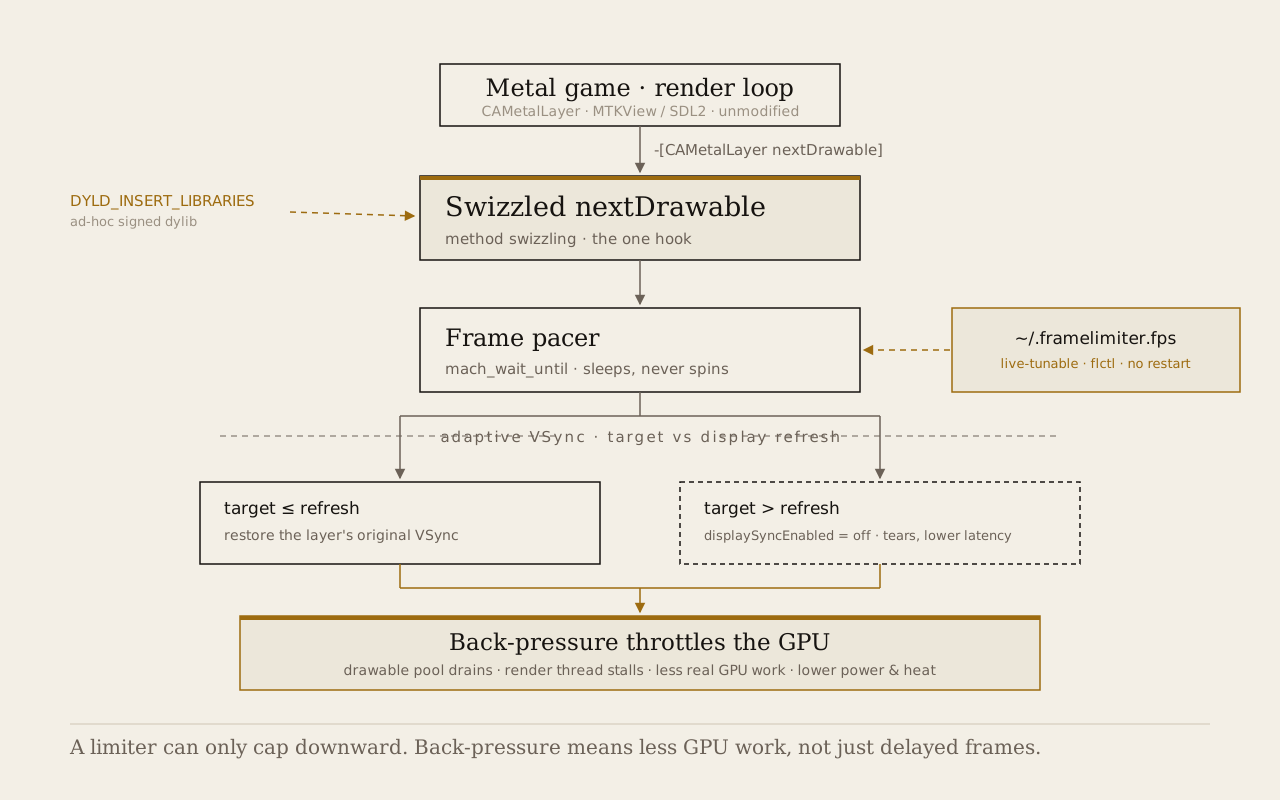
The dylib swizzles nextDrawable and sleeps via mach_wait_until, pacing presentation to apply back-pressure to the GPU.
AppKit screen observers track refresh rates on monitor changes and handle occlusion states to apply background limits dynamically.
visuals
engineering notes
FrameLimiter is a frame-rate limiter for native Metal games on Apple Silicon. It injects a small dylib using DYLD_INSERT_LIBRARIES that caps a game’s frame rate to a custom target, trading input lag for less GPU power and heat.
I’ve evolved this from a simple terminal experiment into a robust game utility with a companion menu-bar app, background occlusion throttling, dynamic screen-refresh detection, and a safe install lifecycle.
One hook
A game gets each frame by asking its CAMetalLayer for the next drawable. FrameLimiter hooks -[CAMetalLayer nextDrawable] (via method swizzling) and paces that one call with mach_wait_until. Basically every native Metal game goes through that method (whether it’s raw Metal, MetalKit/MTKView, SDL2, or MoltenVK) so one hook covers all of them. It sleeps until the next frame is due instead of busy-looping, because busy-looping would burn the power the cap is trying to save.
Back-pressure
Pacing nextDrawable does more than just delay frame presentation. Holding the call back drains the drawable pool and stalls the render thread, which applies back-pressure so the GPU stops rendering new frames. On a fanless laptop, running at 200+ FPS just wastes battery and makes the machine hot for frames the screen can’t even show.
Ephemeral menu-bar & Game wrappers
Steam on macOS can’t pass environment variables through launch options, and script wrappers fail because Steam expects the launched process to have the exact game identifier.
To solve this, I wrote a tiny C wrapper (wrapper.c). The installer swaps the game’s main executable for this compiled wrapper and renames the real game binary to Executable.real. The wrapper inherits the original game’s entitlements during installation so macOS Game Mode and direct-to-display high-refresh paths keep working.
When the game launches:
- The wrapper boots up the
FrameLimiter.appmenu-bar helper. - It sets the
DYLD_INSERT_LIBRARIESenv vars. - It
execvs into the real binary.
Because execv preserves the PID, the menu-bar helper can monitor the game’s exact PID and automatically exit the moment you quit the game. If you open the menu-bar app manually, it stays open for configuring global defaults.
Hardened runtime
If a game is signed with the hardened runtime, macOS strips DYLD_INSERT_LIBRARIES before the process starts, so the dylib never loads. The installer detects this and refuses by default. If you opt in, it re-signs the game binary ad-hoc with its entitlements carried over, which is the only way the injection survives. Entitlements that ad-hoc signing can’t carry (keychain access groups, and similar) are gone after that, and the installer says so before it does it. Games with a __RESTRICT segment can’t be injected at all. Most Steam games aren’t hardened, so most of the time this never comes up.
Background occlusion throttling
Running a game in the background or on another Space shouldn’t bake your laptop. FrameLimiter tracks focus and window occlusion using AppKit notifications (NSApplicationDidResignActiveNotification and NSWindowDidChangeOcclusionStateNotification).
When the game is out of sight, it immediately drops the target frame rate to a low cap (default 10 FPS, configurable via ~/.framelimiter.bgfps). Crucially, it releases its App Nap activity assertion, letting macOS step in and put the game’s render thread to sleep.
Dynamic display detection
The adaptive VSync logic needs to know the display’s actual refresh rate to decide whether to disable sync (above display refresh, prioritizing lower latency) or leave it alone.
Instead of hardcoding 60 Hz or forcing manual config, FrameLimiter queries the main display’s actual refresh rate via AppKit ([NSScreen maximumFramesPerSecond]). It listens for screen configuration changes, so if you drag the game window to a 120 Hz external monitor or change resolutions, the pacing target and VSync decisions adapt on the fly.
Control files and flctl
All configuration (the FPS target, background cap, HUD state, and live status) is stored in simple files under ~/.framelimiter.*.
- The dylib writes a status heartbeat (
~/.framelimiter.status) containing the game’s PID, measured FPS, and state once per second. - The
flctlCLI reads and writes these files, letting you bind caps to global hotkeys (e.g. via Hammerspoon). - The menu-bar app reads the status heartbeat to draw live FPS charts and displays a list of your Steam library, letting you install or uninstall the wrapper with a single click.