This page explains core high-level pipelines in llmedge: RAG flow, Image Captioning pipeline, and JNI/native model loading. Each section includes a small diagram and notes on important implementation details.
RAG (Retrieval-Augmented Generation) flow
Diagram (RAG flow):
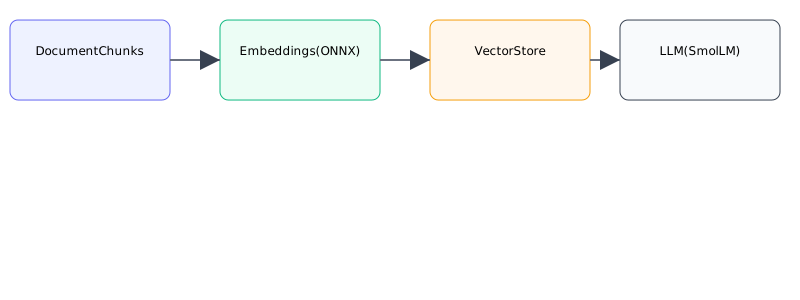
Flow summary
- Document ingestion:
PDFReader/ text input. Text is chunked byTextSplitter. - Embedding: For each chunk, an embedding is computed using an on-device embedding model (ONNX/ONNXRuntime or similar) via
EmbeddingProvider. - Vector store: Chunks + embeddings are stored in
VectorStore(simple on-device vector DB or file-backed store). - Query time: On a user question,
RAGEngine.retrievalPreview()orRAGEngine.contextFor()performs nearest-neighbor search to produce a context. - LLM prompt: The retrieved context is included in a system or user prompt sent to
SmolLMto generate a final answer.
Implementation notes
- Chunk overlap and chunkSize matter: typical defaults: 600 tokens chunk, 120 overlap.
- Score thresholds: RAG implements filtering by score to avoid adding noisy context.
- On-device embedding models must be small/lightweight; prefer quantized ONNX models.
Image Captioning pipeline
Diagram (image captioning):
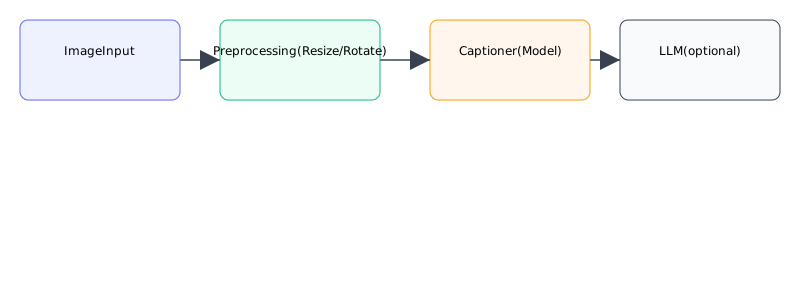
Flow summary
- Capture or pick image (camera/file). Normalize orientation and scale to model input size.
- Optionally run OCR (MlKit or other) to extract text first.
- For VLM flows, encode the image with the matching projector/mmproj file into prepared embeddings.
- Replay those embeddings into the current
SmolLMcontext and run the multimodal prompt.
Implementation notes
- Resize images before sending to the model to avoid memory spikes.
- Use background threads (Dispatchers.IO) for image processing.
- The VLM path is intentionally fail-fast: if the projector/mmproj file is missing or native projector support is unavailable, the library now reports that explicitly instead of pretending a text-only fallback is equivalent.
- The current high-level vision path creates a fresh
SmolLMruntime per request rather than using a shared cache, so it behaves as a sequential-per-request path.
JNI / Native model loading flow
Diagram (JNI loading):
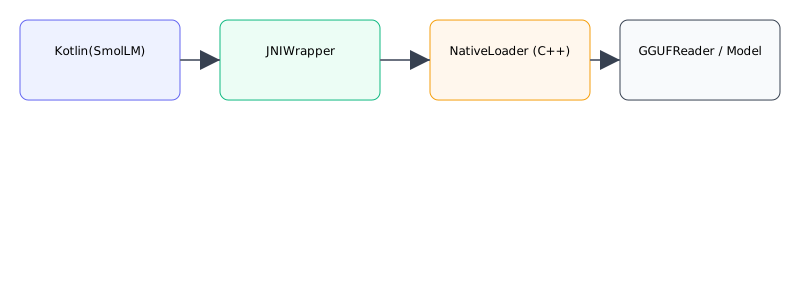
Flow summary
- Kotlin calls
SmolLM.load(...)or native loader method. - JNI wrapper forwards the path/params to native C++ (
LLMInference,GGUFReader). - Native layer loads the GGUF model, builds internal tensors and attention caches, and returns a handle.
- Kotlin uses the handle to call
infer/generatefunctions. Streams are forwarded back to Kotlin via JNI callbacks or polling. close()triggers native cleanup and frees memory.
Implementation notes
- Avoid calling native load/generation on the main thread.
- Text inference now distinguishes prompt/batch threads from single-token generation threads via the underlying llama.cpp
llama_set_n_threads(ctx, n_threads, n_threads_batch)split. - High-level blocking text generation uses batched native completion calls by default, while streaming uses smaller batched chunks to reduce JNI crossings without delaying UI updates too much.
- Text-model cache sizing is refreshed from native model/state memory estimates so eviction policy follows actual runtime footprint more closely than GGUF file size alone.
- Ensure ABIs packaged in
lib/match device architecture (arm64-v8a is recommended for modern devices). - Include
System.loadLibrary(...)in a static initializer or trusted module; guard with try/catch and surface meaningful errors to the user.
Key files
RAG components:
llmedge/src/main/java/io/aatricks/llmedge/rag/RAGEngine.ktllmedge/src/main/java/io/aatricks/llmedge/rag/EmbeddingProvider.ktllmedge/src/main/java/io/aatricks/llmedge/rag/VectorStore.ktllmedge/src/main/java/io/aatricks/llmedge/rag/PDFReader.ktllmedge/src/main/java/io/aatricks/llmedge/rag/TextSplitter.kt
Vision components:
llmedge/src/main/java/io/aatricks/llmedge/vision/ImageUnderstanding.ktllmedge/src/main/java/io/aatricks/llmedge/vision/OcrEngine.ktllmedge/src/main/java/io/aatricks/llmedge/vision/ocr/MlKitOcrEngine.ktllmedge/src/main/java/io/aatricks/llmedge/vision/VisionModelAnalyzer.kt
Note: OCR support is the more stable image-understanding path today. Projector-based VLM analysis is still evolving and depends on a compatible mmproj + model pairing.
Core LLM:
llmedge/src/main/java/io/aatricks/llmedge/LLMEdge.kt(Instance-based high-level facade)llmedge/src/main/java/io/aatricks/llmedge/SmolLM.ktllmedge/src/main/java/io/aatricks/llmedge/GGUFReader.ktllmedge/src/main/cpp/(native JNI implementation)
Hugging Face integration:
llmedge/src/main/java/io/aatricks/llmedge/huggingface/HuggingFaceHub.ktllmedge/src/main/java/io/aatricks/llmedge/huggingface/HFModelDownload.kt
For more details, see the code in the repository and the llmedge-examples project which demonstrates each flow in practice.